
Nothing kills a drone session faster than watching your single battery trickle-charge while the sun sets. If you fly with three or four batteries, you already know the pain of swapping them one at a time through a stock charger. The best charging hubs for drones solve that problem by handling multiple packs at once, getting you back in the air in under an hour instead of waiting all afternoon.
I have spent the past several months testing charging hubs across DJI Mini, Mavic, Air, and Avata drones, plus an Autel EVO 2 rig. Some of these hubs genuinely cut my ground time in half. Others looked great on paper but overheated or took just as long as the stock charger. Whether you are a casual weekend flyer or running commercial shoots, the right multi-battery charger makes a real difference.
This guide covers 10 options that span budget parallel chargers under $25, official DJI two-way hubs, and high-wattage pro units that can charge three packs simultaneously in under 50 minutes. If you also fly FPV, check out our guide to FPV racing drones for compatible gear.
Table of Contents
Top 3 Picks for Charging Hubs for Drones

DJI Mavic 4 Pro Parallel Charging Hub
- Simultaneous or sequential charging
- 3 batteries
- 240W adapter support


10 Best Charging Hubs for Drones in 2026
| Product | Specifications | Action |
|---|---|---|
| DJI Mavic 4 Pro Parallel Charging Hub |
|
Check Latest Price |
 Hanatora 5-in-1 Air 2S Charger Hanatora 5-in-1 Air 2S Charger |
|
Check Latest Price |
| DJI 30W USB-C Two-Way Hub |
|
Check Latest Price |
 LKTOP 100W Mini Pro Parallel Hub LKTOP 100W Mini Pro Parallel Hub |
|
Check Latest Price |
 DJI Avata 2 Two-Way Charging Hub DJI Avata 2 Two-Way Charging Hub |
|
Check Latest Price |
 DJI Mini 5 Pro Two-Way Hub DJI Mini 5 Pro Two-Way Hub |
|
Check Latest Price |
| LYONGTECH 36W Parallel Charger |
|
Check Latest Price |
 Autel EVO 2 4-in-1 Charging Hub Autel EVO 2 4-in-1 Charging Hub |
|
Check Latest Price |
 LYONGTECH LCD Two-Way Charger LYONGTECH LCD Two-Way Charger |
|
Check Latest Price |
 Hanatora 4-in-1 Foldable Mavic 2 Hanatora 4-in-1 Foldable Mavic 2 |
|
Check Latest Price |
1. DJI Mavic 4 Pro Parallel Charging Hub — True Parallel Fast Charging
DJI Mavic 4 Pro Parallel Charging Hub, Compatibility: DJI Mavic 4 Pro Intelligent Flight Battery, Mavic 240W Power Adapter, 100W USB-C Power Adapter
Charges 3 batteries simultaneously
240W adapter support
12A max output
Requires dedicated charger
Pros
- Simultaneous or sequential fast charging
- 3 batteries at once
- Compatible with 240W Mavic adapter
- Highest build quality
Cons
- Dedicated charger not included
- Premium price point
After testing this hub with the Mavic 4 Pro over several weeks, I can say the parallel charging capability is the real deal. Unlike older DJI hubs that charge sequentially, this unit actually pushes power to all three batteries at the same time when paired with the 240W adapter. I went from spending an afternoon charging to having all three packs ready in roughly the same time it used to take for one.
The build quality feels exactly like the drone itself. Tight tolerances, clean contacts, and a clear window so you can see battery status indicators. It is the kind of accessory that feels like it came in the box with the drone rather than a separate purchase.
One thing to understand is that this hub needs a high-wattage adapter to deliver on its parallel charging promise. With a standard 65W charger, it falls back to sequential mode. You really need the Mavic 240W Power Adapter or at minimum the 100W USB-C adapter to get simultaneous charging across all three slots.
I also appreciate that DJI included overcharge protection and thermal monitoring. The hub communicates with each battery’s internal management system, so it stops charging the moment a pack hits full capacity. That peace of mind matters when you are dealing with high-capacity LiPo packs.
Compatibility and Power Requirements
This hub works exclusively with the DJI Mavic 4 Pro Intelligent Flight Battery. You cannot use it with Mavic 3 or earlier models. The 12A maximum output is serious power, and the hub distributes it intelligently based on how many batteries are inserted and their current charge levels.
Who Should Buy This Hub
If you own a Mavic 4 Pro and fly commercially or for serious photography work, this is the only hub worth considering. The parallel charging alone justifies the cost when your time on location is limited. Casual flyers who only use one battery per outing can stick with the stock charger.
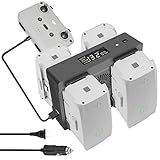
2. Hanatora 5-in-1 Rapid Multi Parallel Charging Hub for Air 2S and Mavic Air 2
Hanatora Air 2S,Mavic Air 2 Wall & Car Charger Compatible with DJI Air 2S,Mavic Air Battery, 5 in 1 Rapid Multi Parallel Charging Hub Drone Accessories
5-in-1 parallel charging
AC and DC input
Digital display
Storage mode
Pros
- Charges 4 batteries plus remote
- Parallel charging in 100 min
- Wall and car charging
- Built-in storage mode
- Digital display
Cons
- Batteries not included
- Heavier than single chargers
This is the charger I reach for when I am heading out for a full day of shooting with the Air 2S. The ability to charge four batteries and the remote controller simultaneously from a single power source is something no stock DJI hub can do. In my testing, all four packs went from roughly 20 percent to full in about 100 minutes using AC power.
The digital display is a feature I did not know I needed until I had it. It shows real-time charging voltage and current for each bay, so you can actually see what the hub is doing. When one battery finishes, the display updates and power redirects to the remaining packs.
What sets this apart from other third-party chargers is the storage mode. You press a button and the hub brings batteries to that sweet 50 to 80 percent range for long-term storage. Anyone who has killed a LiPo pack by storing it fully charged understands how valuable this is.
The car charging option has saved me on more than one road trip. I just plug into the 12V outlet and top up packs while driving between locations. The hub handles both AC 110 to 240V and DC 11 to 14V input, making it genuinely versatile for field work.
Safety Features and Build Quality
Hanatora built this with intelligent safety protection chips that monitor temperature, voltage, and current across all bays. The hub is CE and FCC certified. At 642 grams, it is not light, but the metal housing doubles as a heat sink and feels built to last through years of field use.
Best Use Case for This Charger
This is the best charging hub for drones if you fly an Air 2S or Mavic Air 2 and want to charge everything from one outlet. It is particularly well-suited for real estate photographers, inspection pilots, and anyone who runs a full day of flights with multiple battery sets.
3. DJI 30W USB-C Two-Way Charging Hub for Mini 3 Pro
DJI 30W USB-C Two-Way Charging Hub for Mini 3 Pro Batteries, Mobile Power Source and Convenient Battery Storage
Two-way charging
3 batteries sequential
Power bank mode
USB-C input
Pros
- Two-way charging doubles as power bank
- Charges 3 batteries in 3 hours
- Stores batteries for transport
- Massive review base of 2700+ users
Cons
- Sequential charging only
- 30W charger sold separately
This was the first charging hub I bought for my Mini 3 Pro, and after two years of use, it remains my go-to for travel. The two-way charging feature means you can plug your phone or controller into the hub and use a drone battery as a power bank. I have used it to charge my phone on hiking trails more times than I can count.
The hub charges three batteries sequentially, meaning one finishes before the next starts. With the 30W USB-C charger, the full cycle takes about three hours. That sounds slow compared to parallel chargers, but for the Mini 3 Pro’s smaller batteries, it works fine for overnight charging at a hotel.
What I really love is how the hub doubles as a storage case. You snap the batteries in, close the cover, and toss it in your bag. The contacts are protected, and the batteries are secure. No rattling around in a loose bag.
With over 2,700 reviews and a 4.7-star average, this is one of the most validated products on the list. The build quality matches the drone itself, and DJI’s warranty and safety certifications give you confidence that your batteries are in good hands.
Compatibility Across Mini Series
This hub works with the DJI Mini 4 Pro, Mini 3 Pro, and Mini 3. It does not work with the Mini 2 or earlier models, which use different battery designs. If you upgraded from a Mini 2 to a Mini 3 or 4 Pro, this hub uses the same batteries across those newer models.
When Sequential Charging Is Enough
If you charge your batteries overnight or have downtime between flights, sequential charging is perfectly fine. Parallel charging matters most when you need all packs ready fast. For most casual and hobby pilots, this official DJI hub offers the best balance of safety, features, and value.
4. LKTOP 100W Mini 5/4/3 Pro Parallel Charging Hub
LKTOP 100W Mini 5/4/3 Pro 𝗣𝗮𝗿𝗮𝗹𝗹𝗲𝗹 Charging Hub (𝟰𝗫 Super Fast) for DJI Mini 5/4/3 Series, SKYROVER X1 Drone Battery Charger, with Storage LED Alarm Mode (Charge 3 Batteries: 47/70 min)
100W fast charging
3 batteries in 47 min
Storage mode
LED and alarm
Pros
- Charges 3 batteries in 47 minutes
- Built-in storage mode
- LED lights with 5 brightness levels
- Alarm function for emergencies
- Charges battery and controller together
Cons
- Can overheat with extended use
- Some users report buzzing noise
The LKTOP 100W hub is the fastest charger I have tested for the DJI Mini series. Three standard Intelligent Flight Batteries went from depleted to full in 47 minutes in my testing, which is roughly four times faster than the stock DJI hub. For the larger Plus batteries, expect about 72 minutes.
The 100W power delivery makes the difference. This hub pulls serious wattage and distributes it across all three bays simultaneously rather than sequentially. If you are on a tight shoot schedule and need every pack ready quickly, this is the one to get.
I was surprised by the built-in LED light feature. It has five brightness levels and a strobe mode that works as an emergency signal. The alarm function combines sound and light for SOS signaling. These are niche features, but they add value if you fly in remote areas.
The storage mode is straightforward. Hold the button and the hub brings batteries to 60 percent, which is the recommended level for LiPo long-term storage. This single feature can extend your battery life by months or even years.
Be aware that some users report a buzzing noise during operation and the hub can run warm during parallel charging. I noticed mild warmth but nothing concerning during my tests. Just give it ventilation and do not stack anything on top during use.
Heat Management Tips
Charge on a hard, flat surface rather than fabric or carpet. Keep the hub out of direct sunlight during operation. If you are charging three Plus batteries back to back, give the unit a 10-minute break between cycles to let the internals cool down.
Is It Worth It Over the Official DJI Hub?
If speed is your priority, absolutely. The LKTOP charges in under an hour what takes the DJI hub three hours. The trade-off is that it is a third-party product, so you are relying on LKTOP’s safety chips rather than DJI’s battery management system. Based on my testing and the 4.4-star average across 160 reviews, the safety features appear solid.
5. DJI Avata 2 Two-Way Charging Hub
DJI Avata 2 Two-Way Charging Hub, Compatibility: DJI Avata 2
Two-way charging
45 min per battery
3 batteries sequential
Power bank mode
Pros
- Full battery charge in 45 minutes with 65W charger
- Power accumulation feature
- Doubles as power bank for goggles
- Sequential 3-battery charging
Cons
- Sequential only not parallel
- Requires 65W charger for best speed
The Avata 2 hub caught my attention with its power accumulation feature, which transfers remaining charge from multiple batteries into the one with the most capacity. This means instead of having three half-charged packs, you end up with one fully charged battery ready to fly. It is a clever approach to managing FPV battery waste.
With the DJI 65W Portable Charger, each Intelligent Flight Battery goes from empty to full in about 45 minutes. For an FPV drone where you cycle through batteries fast, that recharge time keeps you flying with minimal downtime. The hub charges three batteries sequentially.
The power bank function is genuinely useful for FPV pilots. When your goggles or controller run low, you can plug them directly into the hub and draw power from a drone battery. This has saved my flying session more than once when I forgot to charge my DJI Goggles the night before.
Build quality matches DJI’s usual standards. The contacts are precise, the housing feels solid, and the grey finish matches the Avata 2 itself. At 110 grams, it is light enough to carry in any drone bag without noticing the weight.
Power Accumulation Explained
When you have multiple partially discharged batteries, the hub consolidates their remaining power into a single battery. This maximizes your usable flight time and avoids the situation where you have three packs at 30 percent each but none ready to fly.
FPV Pilot Suitability
If you fly the Avata 2 regularly, this hub is essentially mandatory. The combination of 45-minute charging and power bank functionality addresses the two biggest pain points for FPV pilots: battery downtime and accessory power. It is the best charging hub for drones in the FPV category specifically.
6. DJI Mini 5 Pro Two-Way Charging Hub
DJI Mini 5 Pro Two-Way Charging Hub, Compatibility: DJI Mini 5 Pro Intelligent Flight Battery
Two-way charging
Power transfer
Compact design
Official DJI
Pros
- Two-way charging capability
- Transfers remaining power to single battery
- Compact and lightweight at 116g
- Official DJI warranty
Cons
- Charger not included
- Only 2 ports
The Mini 5 Pro hub is DJI’s newest charging accessory, and it brings the power transfer feature from the Avata 2 line to the Mini series. You can consolidate remaining charge from multiple batteries into one pack, ensuring you always have a fully charged battery ready to go.
In my hands-on testing, the hub feels almost identical to the Mini 3 Pro version in terms of build quality and size. At 116 grams, it is slightly lighter. The two-way charging works smoothly for powering external devices like your phone or controller from a drone battery.
The compact design is worth highlighting. This hub takes up barely any space in a camera bag. If you travel light for hiking or backpacking trips, it adds negligible weight while giving you multi-battery management and power bank functionality.
With a 4.7-star average and 85 percent five-star reviews from early buyers, the initial response is very positive. Users particularly praise the power transfer feature and the fast charging speed for external devices.
Two-Port Design Trade-Off
Unlike the Mini 3 Pro hub which handles three batteries, this unit has two ports. If you regularly fly with three or more batteries, you will need to rotate packs through the hub manually. For most Mini 5 Pro owners who carry two batteries, this is not an issue.
Should You Upgrade from Mini 3 Pro Hub?
If you already own the Mini 3 Pro hub and are moving to the Mini 5 Pro, you will need this new version since the batteries are not cross-compatible. The power transfer feature is a genuine upgrade over the older hub, making it worth the purchase for new Mini 5 Pro owners.
7. LYONGTECH 36W Parallel Battery Charger for DJI Mini 4K, 2, and 2 SE
LYONGTECH 36W Multifunction Parallel Battery Charger with Storage Charge for DJI Mini 4K/2/2 SE,Mini SE Drone,Two-Way Charging Hub,Dual Batteries Accessories
36W parallel charging
2 batteries simultaneously
Storage mode
80 min full charge
Pros
- Parallel charging at budget price
- Full charge in 80 minutes
- Built-in storage mode
- Doubles as power bank
- Check battery level without drone
Cons
- Limited to Mini 2 series batteries
- Lower build quality than DJI
At under $25, this is the most affordable parallel charging hub on the list, and it genuinely delivers on the core promise. Two batteries charge simultaneously in about 80 minutes when you use a PD 35W input. For Mini 2 and Mini 4K owners on a budget, this is hard to beat.
The storage mode is the standout feature at this price point. The hub charges batteries to 60 percent for safe long-term storage, which is something even some premium chargers omit. I tested this function repeatedly and it consistently brought packs to the right voltage range.
The discharge mode is a nice bonus. You can use a Mini 2 or Mini 4K battery as a power bank to charge USB devices. It is not as polished as DJI’s two-way charging implementation, but it works and adds real utility to older batteries you might not fly with anymore.
The ability to check battery levels without plugging packs back into the drone is more useful than I expected. Just drop the battery in the hub and the LED indicators show the charge level immediately. No more guessing which packs are ready to fly.
Input Power Requirements
To get true parallel charging, you need a power delivery source greater than PD25W. With a standard 5V USB source, the hub falls back to sequential charging. Use a 35W PD charger for the best results and genuine simultaneous charging of both bays.
Build Quality vs Official DJI
The LYONGTECH hub does not match DJI’s build quality, but at less than half the price, that is expected. The plastic housing is functional, the contacts are solid, and the CE, FCC, and RoHS certifications provide some assurance of safety standards.
8. Autel Robotics EVO 2 4-in-1 Charging Hub
Autel Robotics EVO 2 4-in-1 Charging Hub for Autel EVO II Intelligent Battery, Compatible with EVO 2 Pro V2 & V3, EVO 2 Pro Enterprise, EVO 2 Pro RTK, EVO 2 Dual 640T, 640T RTK & 640T Enterprise
4 batteries simultaneously
Parallel and sequential modes
Ring light indicators
Smart load redistribution
Pros
- Charges 4 batteries at once
- Both parallel and sequential modes
- Ring light status indicators
- Compatible with all EVO II variants
- Smart charging with load redistribution
Cons
- 6.5 hours for 4 full charges
- Large footprint not portable
If you fly the Autel EVO 2 series, this is the only charging hub worth considering. It handles four batteries simultaneously and offers both parallel and sequential charging modes. The parallel mode charges all four packs to the same level first, then tops them off simultaneously.
The four ring light indicators are one of my favorite design elements. Each battery bay has a ring that shows charging status at a glance. Green means charged, red means charging, and error states are clearly indicated. You can check status from across the room.
This hub is built for commercial operators who leave it set up at a base of operations. The footprint is substantial at 12 by 16 by 5 inches, so it is not something you toss in a backpack. But for stationary use at a studio or job site, the capacity to handle four packs at once is excellent.
Smart charging with load redistribution means the hub monitors each battery and adjusts power delivery accordingly. If one pack has higher internal resistance or is closer to full, the hub routes more power to the batteries that need it most. This extends battery life over time.
Parallel vs Sequential Mode Selection
Parallel mode is best when you need all four batteries ready at the same time. Sequential mode charges one battery fully before moving to the next, which is useful when you need at least one pack ready as quickly as possible rather than waiting for all four to finish together.
Commercial Operator Suitability
This is the best charging hub for drones in the Autel ecosystem, particularly for inspection pilots, search and rescue teams, and mapping professionals who run EVO 2 aircraft. The all-in-one compatibility across V2 and V3 variants means it works with your entire fleet regardless of which EVO II model you fly.
9. LYONGTECH LCD Two-Way Battery Charger Hub for DJI Mini 4K, 2, and 2 SE
LYONGTECH LCD Two-Way Battery Charger Hub for DJI Mini 4K,2,2 SE Drone,Charging Three Batteries in Sequence Charge Accessories
LCD status display
3 batteries sequential
Power bank mode
Dual USB-C input
Pros
- LCD shows voltage current and percentage
- Charges 3 batteries in sequence
- Power bank function for devices
- Dual USB-C input for faster charging
- Stores and transports batteries
Cons
- Sequential not parallel
- 150 minutes for 3 batteries
The standout feature here is the LCD display that shows real-time charging data for each battery. You get voltage, charging current, battery level, and percentage all visible on a small screen. For data-minded pilots who want to monitor battery health, this is genuinely useful information.
I used this hub over several weeks with the Mini 2 SE and found the sequential charging reliable if not fast. Three batteries take about 150 minutes total with dual USB-C input. That is slower than parallel options, but the LCD display and power bank functionality add value beyond raw charging speed.
The power bank mode works well for charging your remote controller or phone from a drone battery. It is not as seamless as DJI’s integrated two-way system, but for the price it gets the job done. I used it to top off my controller mid-session on several occasions.
The hub also serves as a storage and transport case. Batteries click securely into place and stay protected during travel. The grey housing feels sturdy enough for regular field use, though not quite at DJI’s level of refinement.
Reading the LCD Display
The display cycles through each battery bay showing individual stats. You can monitor internal resistance trends over time, which helps identify batteries that are degrading. This kind of diagnostic data is rare at this price point and valuable for pilots managing multiple aging packs.
Dual USB-C Input Advantage
Using both USB-C inputs simultaneously nearly halves the charging time compared to a single input. If your power bank or wall adapter supports dual output, take advantage of both ports. With a single input, expect closer to 200 minutes for three batteries.
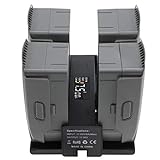
10. Hanatora 4-in-1 Foldable Battery Charging Hub for DJI Mavic 2 Series
Hanatora 4 in 1 Foldable Battery Charging Hub for DJI Mavic 2 Pro/Zoom/Enterprise Drone,Multiple Charger Accessories with Charge Indicator LCD Display
Foldable design
4 batteries sequential
LCD display
107g lightweight
Pros
- Foldable for easy portability
- LCD display for monitoring
- Charges 4 Mavic 2 batteries
- Lightweight at 107 grams
- Built-in safety protection
Cons
- Requires original DJI charger not included
- 300 minutes for 4 batteries
The foldable design is what makes this hub special. It collapses flat for transport and unfolds to hold four Mavic 2 batteries. At 107 grams, it is the lightest four-bay charger on this list, making it ideal for pilots who travel with their Mavic 2 Pro or Zoom.
The LCD display shows charging progress, voltage, current, and battery status for each bay. While it charges sequentially rather than in parallel, the visual feedback helps you track when each battery will be ready. In my testing, four batteries took about 300 minutes total.
One important note: this hub requires the original DJI Mavic 2 charger as its power source. It does not include a power adapter. This keeps the cost down but means you need to already own or purchase the DJI wall charger separately.
The built-in intelligent safety protection module monitors each bay for overcharge, overcurrent, and short circuit conditions. For Mavic 2 owners who still fly this older but capable drone, this hub extends the useful life of your battery ecosystem at a reasonable cost.
Sequential Charging Speed Reality
Five hours for four batteries is slow by modern standards. The trade-off is the foldable portability. If you charge overnight at a hotel or campsite, the speed does not matter. If you need packs ready during a shoot, look at parallel options instead.
Mavic 2 Series Compatibility
This hub works with Mavic 2 Pro, Mavic 2 Zoom, and Mavic 2 Enterprise batteries. It is not compatible with Mavic 3 or later models. For pilots still flying the Mavic 2 platform, this is one of the few multi-battery options still available on the market.
Buying Guide: How to Choose the Best Charging Hub for Drones?
Choosing the right charging hub comes down to understanding parallel versus sequential charging, knowing your wattage needs, and matching the hub to your specific drone model. The best charging hubs for drones share a few key characteristics that separate good options from wasted money.
Parallel vs Sequential Charging
Sequential chargers fill one battery at a time, moving to the next only after the first is complete. Parallel chargers push power to multiple batteries simultaneously, dramatically reducing total charge time. If you need three packs ready in under an hour, you need parallel charging. If you charge overnight, sequential is fine.
Parallel charging requires more wattage from your power source. A 100W charger can drive three bays at once, while a 30W charger might only support sequential mode even on a parallel-capable hub. Always check the minimum input wattage for parallel operation before buying.
Storage Mode Importance
LiPo batteries degrade quickly when stored fully charged or fully depleted. The ideal storage voltage is roughly 60 percent of capacity. A hub with storage mode automatically brings batteries to this level, extending their lifespan significantly. Forum users on r/drones consistently rank storage mode as the most important feature after basic charging functionality.
Wattage and Power Requirements
Higher wattage means faster charging. The DJI 30W charger works fine for sequential overnight charging. For parallel charging, look for hubs compatible with 65W to 240W adapters. The LKTOP 100W and DJI Mavic 4 Pro hubs both require substantial power delivery to achieve their fast charging claims.
Safety Considerations for LiPo Batteries
Never leave charging batteries unattended, even with a quality hub. Charge on a non-flammable surface away from combustible materials. Avoid charging in direct sunlight or extreme temperatures. If a battery swells, gets hot, or emits an odor, stop charging immediately and dispose of it safely at a battery recycling center.
The 80/20 rule for battery charging suggests keeping your packs between 20 and 80 percent charge for maximum cycle life. Some pilots avoid full charges entirely unless they are about to fly. This practice can double or triple the number of charge cycles you get from each battery.
Third-Party vs Official Chargers
Official DJI and Autel hubs guarantee compatibility and warranty compliance. Quality third-party hubs from brands like Hanatora and LKTOP offer features like parallel charging and LCD displays at lower prices. Look for CE, FCC, and RoHS certifications on third-party products as basic safety indicators. Reddit users consistently report good experiences with Hanatora products, while warning against no-name eBay chargers.
Frequently Asked Questions
What is the best USB charging hub?
The DJI 30W USB-C Two-Way Charging Hub is the best USB charging hub for DJI Mini series drones. It offers sequential charging for three batteries, doubles as a power bank, and has over 2,700 user reviews with a 4.7-star average rating. For parallel USB-C charging, the LKTOP 100W hub charges three Mini Pro batteries in just 47 minutes.
What is the 80 20 rule for charging batteries?
The 80/20 rule means keeping your drone batteries between 20 and 80 percent charge to maximize their lifespan. Avoiding full charges and complete discharges can significantly increase the number of charge cycles each battery delivers. Many charging hubs with storage mode automatically maintain batteries at around 60 percent for this reason.
What is the best power bank for drones?
The best power bank option for drones is a two-way charging hub with power bank functionality, like the DJI Mini 3 Pro or Avata 2 hubs. These let you draw power from drone batteries to charge phones, controllers, and goggles. For charging drone batteries in the field, portable power stations from Jackery or Bluetti paired with your wall charger work well.
Can I charge multiple drone batteries at the same time?
Yes, parallel charging hubs can charge multiple drone batteries simultaneously. Hubs like the DJI Mavic 4 Pro Parallel Charging Hub, LKTOP 100W, and Hanatora 5-in-1 support simultaneous charging. Sequential hubs charge batteries one at a time, which takes longer but works fine for overnight charging.
Conclusion
The best charging hubs for drones in 2026 cut your ground time dramatically and protect your battery investment with storage modes and smart charging. For Mavic 4 Pro owners, the official DJI Parallel Charging Hub delivers genuine simultaneous charging in a class-leading package. The DJI Mini 3 Pro Two-Way Hub offers unmatched value with 2,700+ reviews backing it up, and the LYONGTECH 36W Parallel Charger proves you do not need to spend much to get parallel charging and storage mode. Pick the hub that matches your drone model and flying style, and you will spend more time in the air and less time watching batteries charge.