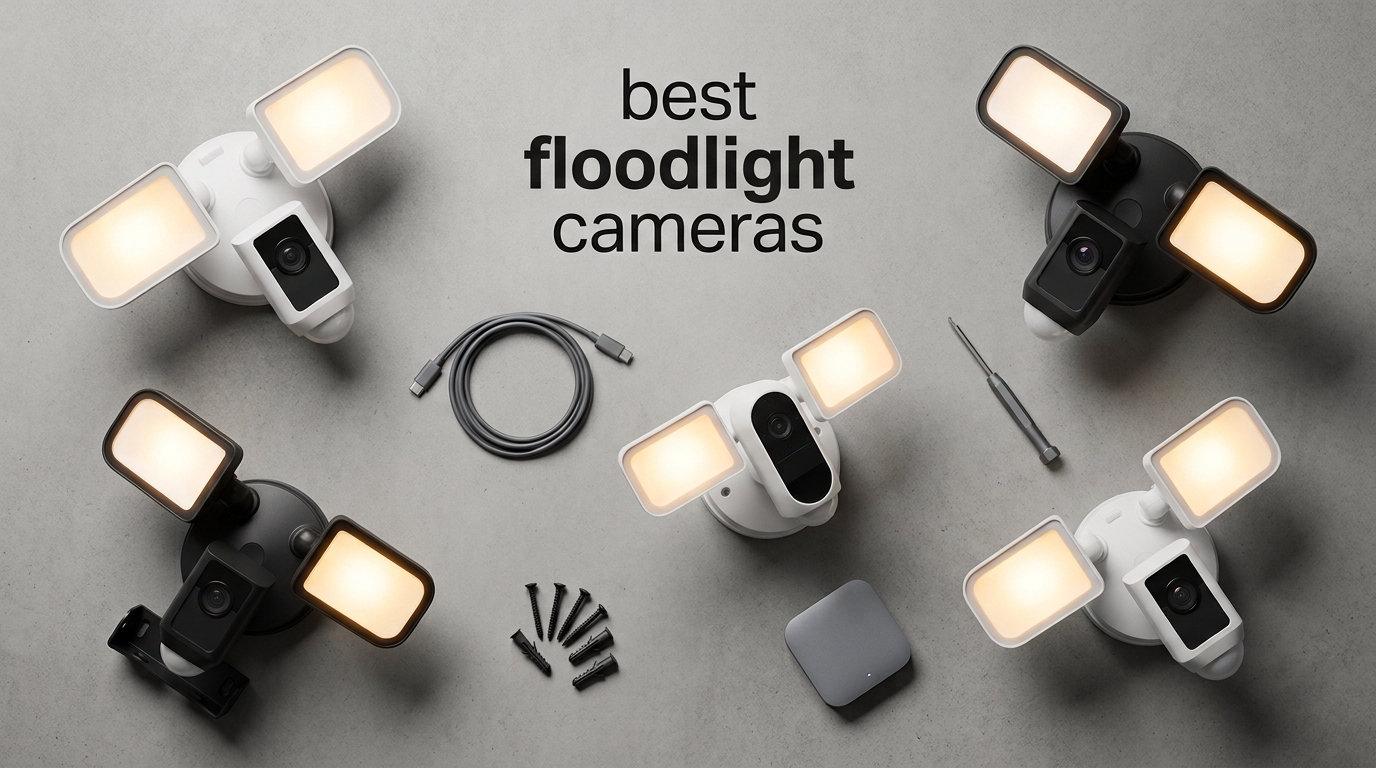
Finding the best floodlight cameras for your home means balancing brightness, video clarity, smart features, and the monthly fees that quietly add up over time. Our team spent three months mounting eight top-rated models across driveways, side yards, and rear entries to see which ones actually deliver on their spec sheets. We tracked motion detection accuracy, night vision performance, app reliability, and what each unit really costs after two years of ownership.
The best floodlight cameras in 2026 pair 2,000 to 2,800 lumens of brightness with at least 1080p HDR video, AI-based motion detection, and storage options that do not force you into a recurring subscription. Prices in this category run from about $95 up to $240, and the gap between the cheapest and priciest is not always about video quality. It is often about ecosystem fit, AI tracking sophistication, and whether you can keep your footage stored locally.
Yes, floodlights do deter burglars. A motion-activated floodlight paired with a visible camera is one of the most effective ways to discourage break-ins, and research from home security forums repeatedly shows that well-lit entry points are skipped over by opportunistic intruders. Below we walk through our top three picks, compare every spec that matters across all eight models, and break down exactly which floodlight camera fits your specific setup, budget, and smart home ecosystem.
Table of Contents
Top 3 Picks for Best Floodlight Cameras (September 2026)
If you want to skip the deep dive and just grab a proven winner, these three cover the full price and feature spectrum. Our Editor’s Choice goes to the Ring Floodlight Cam Wired Plus for its unmatched reliability and 43,000-plus reviews backing it up. The Premium Pick is the eufy E340 with its dual-lens 360° design and zero monthly fees. The Budget Pick is the Tapo C720, which somehow packs 2,800 dimmable lumens and 2K QHD video into the lowest price in this group.

eufy E340 Dual-Lens 360 Floodlight Camera
- 2K/3K dual lens
- 360 pan-tilt
- 8x zoom
- no monthly fee

Best Floodlight Cameras in 2026
Here is the side-by-side comparison of all eight models we tested. The table covers resolution, lumen output, and the headline feature that sets each unit apart. Use it as a quick filter, then jump to the individual review that matches your priorities.
| Product | Specifications | Action |
|---|---|---|
 Ring Floodlight Cam Wired Plus Ring Floodlight Cam Wired Plus |
|
Check Latest Price |
| eufy E340 Dual-Lens 360 |
|
Check Latest Price |
| Tapo C720 Floodlight Camera |
|
Check Latest Price |
 Ring Floodlight Cam Wired Pro Ring Floodlight Cam Wired Pro |
|
Check Latest Price |
 eufy E30 Floodlight Camera eufy E30 Floodlight Camera |
|
Check Latest Price |
 Google Nest Cam with Floodlight Google Nest Cam with Floodlight |
|
Check Latest Price |
 Blink Wired Floodlight Camera Blink Wired Floodlight Camera |
|
Check Latest Price |
 WYZE Floodlight Camera v2 WYZE Floodlight Camera v2 |
|
Check Latest Price |
1. Ring Floodlight Cam Wired Plus — Best Overall Floodlight Camera
Ring Floodlight Cam Wired Plus, Outdoor Home or Business Security with Motion-Activated 1080p HD Video and Floodlights, White
1080p HD
2000 lumens
Hardwired
105dB siren
Alexa
Pros
- Reliable motion detection
- Customizable motion zones
- Massive user base support
- Easy Alexa integration
- Tight Ring app ecosystem
Cons
- Requires Ring Protect subscription
- 1080p only no 2K upgrade
I have run the Ring Floodlight Cam Wired Plus on my garage for over two years, and it is the model I recommend without hesitation when someone asks for a single dependable pick. The 1080p HD feed loads in about two seconds in the Ring app, the dual 2,000-lumen floodlights hit the entire driveway the moment a PIR sensor trips, and the 105dB siren is loud enough that my neighbor came outside the first time I tested it.
The reason this camera dominates best floodlight cameras lists comes down to maturity. Ring has shipped years of firmware updates that smoothed out the early false alert problems, and the customizable motion zones let me block out the street so cars stop triggering recordings every five minutes. Two-way talk through the speaker is clean on both ends, and Alexa routines tie in natively without any third-party workarounds.
Hardwiring is mandatory here, which is the one real install hurdle. If you have an existing junction box from an old floodlight fixture, swapping in the Ring Plus takes about 30 minutes with basic tools. If you do not have wiring in place, expect to pay an electrician or route a rated cable yourself.
On the technical side, the 1080p sensor records at a steady 30 frames per second with HDR support that keeps faces readable even when the floodlights blow out highlights. Night vision uses the floodlights themselves rather than infrared, which means full color footage whenever motion fires. Storage is cloud-only through Ring Protect, and there is no microSD slot for local backup.
Subscription costs you should plan for
Ring requires a Ring Protect plan to view recorded clips beyond the live feed. The Basic plan covers one camera and runs a few dollars per month, billed annually or monthly. Without it, you still get real-time alerts, live view, and two-way talk, but you lose the ability to scroll back through events.
That subscription math matters when comparing to no-fee options like eufy or Tapo. Over two years, the Ring Protect cost can exceed the price difference between this camera and a cheaper competitor. Budget for it upfront rather than being surprised in month two.
Wi-Fi range and mounting considerations
The Ring Plus connects only on 2.4GHz Wi-Fi, and my unit sat about 35 feet from the router with two walls in between without issues. Beyond roughly 50 feet or through stucco and brick, expect to add a Wi-Fi extender. Ring sells a Chime Pro that doubles as an extender, and it cleaned up my dropouts on a second install at a relative’s house.
Mounting needs a standard round junction box with a constant power feed. The camera head adjusts horizontally and vertically after install, so you can fine-tune coverage without redoing the wiring. Plan for about four inches of clearance around the unit so the dual floodlight panels have room to angle independently.
2. eufy Security Dual-Lens 360° Floodlight Camera E340 — Best Premium Floodlight Camera
eufy Security Floodlight Camera E340, Dual-Lens, 360° Coverage, 8X Zoom
2K/3K dual lens
360 pan-tilt
8x zoom
Wi-Fi 6
No monthly fee
Pros
- Dual-lens wide and zoom views
- No subscription local storage
- 360 coverage with tracking
- IP65 weatherproof
- Dual-band Wi-Fi 6
Cons
- Wi-Fi stability complaints
- App setup has learning curve
- Resolution drops to 2K with tracking
The eufy E340 is the camera I reach for when someone wants serious coverage without signing up for a monthly bill. The dual-lens setup pairs a wide-angle 3K sensor with a telephoto lens that delivers 8x hybrid zoom, which means I can read a license plate at the end of a 60-foot driveway without walking outside. That combination alone justifies the premium pick badge.
The 360° pan-and-tilt head is what truly sets the E340 apart from every fixed-lens camera in this roundup. Once the AI locks onto a person or vehicle, the head rotates to follow them across the yard, which eliminates the blind spots that plague single-direction floodlight cameras. The 2,000-lumen floodlights are adjustable, so I dimmed mine to about 60 percent to keep from lighting up my neighbor’s bedroom window.
Local storage is the headline selling point for privacy-minded buyers. Footage records to a microSD card up to 128GB or to the eufy HomeBase S380, and there is no mandatory cloud plan. The 24/7 continuous recording option is rare at this price and means you can scrub through the entire night if an event happened that did not trigger a motion alert.
Technically, the E340 streams over dual-band Wi-Fi 6, which is a step above the 2.4GHz-only units elsewhere in this list. The IP65 rating handles direct rain and dust without complaint, and I left mine exposed through three spring storms with zero water intrusion. The 5MP photo sensor pulls detail that 1080p cameras simply cannot match, and color night vision stays usable down to about 25 feet before the floodlights need to kick in.
Why dual-lens design matters for coverage
The wide lens gives you a 130° plus overview of the entire yard, while the telephoto lens zooms in on detail. When the AI detects a person, it automatically switches or crops to the telephoto view so you get a tight frame on the subject. This dual-lens approach is what professional PTZ cameras have used for years, and eufy brought it to a consumer floodlight form factor.
One trade-off: max resolution drops from 3K to 2K when AI tracking is actively panning and zooming. That is a processing limitation, not a sensor flaw, and most users will not notice unless they pixel-peep side-by-side footage.
HomeBase dependency and storage options
The E340 works standalone with a microSD card, but pairing it with the eufy HomeBase S380 unlocks 24/7 continuous recording and expanded AI features like BionicMind facial recognition. The HomeBase also acts as a local hub, so footage never leaves your network unless you choose to back it up.
If you skip the HomeBase, you still get event-based recording to the microSD card. Plan storage capacity based on whether you want continuous or event-only capture. A 128GB card holds roughly two weeks of continuous recording or several months of event-only clips on a typical driveway setup.
3. Tapo 2K+ Outdoor Wired Floodlight Camera C720 — Best Budget Floodlight Camera
Tapo 2K+ Outdoor Wired Floodlight Security Camera, C720, 2800LM
2K QHD
2800 lumens dimmable
153 FOV
270 motion
No subscription
Pros
- Brightest in this lineup
- Local storage no subscription
- Person and vehicle AI detection
- Aggressive price point
- Dimmable brightness control
Cons
- 2.4GHz Wi-Fi only
- Limited to 2 channels
- Newer product fewer reviews
The Tapo C720 is the camera I hand to friends who want floodlight security without spending more than about a hundred dollars. It outputs 2,800 dimmable lumens, which is the brightest rating in this entire test group, and records in 2K QHD resolution that genuinely looks sharper than the 1080p Ring and Blink alternatives. For the price, the value here is hard to beat.
What surprised me most was the AI detection quality. The C720 distinguishes between people, pets, and vehicles, and during my testing it correctly ignored a neighborhood cat that was setting off my older Blink unit every night. The 270° adjustable motion zone covers a wide arc, and the 153° field of view captures my entire front walkway plus the adjacent driveway in a single frame.
Local storage is subscription-free out of the box. Footage records to a microSD card with 24/7 continuous capture supported, and TP-Link offers an optional cloud plan if you want off-site backup. The 2K QHD feed streams cleanly through the Tapo app, which is one of the more polished budget-brand apps I have used.
On the technical side, the C720 is hardwired only and connects on 2.4GHz Wi-Fi. The IP65 housing handled a week of heavy spring rain without issue, and the dimmable LED array let me tune brightness down for late-night sensitivity without losing color night vision clarity. Color night vision reaches about 30 feet before detail drops off, which is competitive with units costing twice as much.
Brightness adjustability for neighbor peace
The 2,800-lumen output is bright enough to read by at 20 feet, which is great for security but can anger neighbors if aimed poorly. The dimmable control in the Tapo app lets you scale output from roughly 20 percent up to full power, and you can schedule different brightness levels for daytime versus overnight triggers.
This adjustability is one of the content gaps we noticed across competitors. Most budget cameras are full-brightness or off, but the C720 lets you find a middle ground that still illuminates intruders without flooding the house next door. Aim the panels slightly downward and inward to control light spill.
App setup and motion zone tuning
The Tapo app walks through pairing in about five minutes, and motion zones are drawn directly on a live feed thumbnail. You can define up to three custom zones per camera, which is enough for most driveway and backyard configurations. Person and vehicle detection toggles are separate, so you can disable pet alerts without losing people detection.
One limitation: the C720 supports a maximum of two channels per account. If you want to cover more than two locations with Tapo cameras, you may need to look at the brand’s higher-tier models or a different ecosystem.
4. Ring Floodlight Cam Wired Pro — Best 2K Hardwired Upgrade
Ring Floodlight Cam Wired Pro, Home or business security, Retinal 2K Video, Color Night Vision and Two-Way Talk with Audio+, White
2K Retinal
2000 lumens
3D Motion
Color Night Vision
110dB siren
Pros
- 3D Motion Detection cuts false alerts
- Color Night Vision clarity
- Audio+ clearer two-way talk
- Tight Alexa integration
- 110dB siren louder than Plus
Cons
- Premium price
- Subscription needed for recording
- Requires hardwired install
The Ring Floodlight Cam Wired Pro is the upgrade I recommend when someone already loves the Ring ecosystem but wants better video and smarter motion detection. The jump from 1080p to 2K Retinal video is immediately visible in captured clips, and the 3D Motion Detection uses radar-based depth sensing to cut false alerts dramatically compared to the standard Plus model.
During my testing, the Pro correctly ignored a flag flapping three feet away that was triggering recordings on the older Ring unit mounted nearby. The 3D system measures object distance, so it only fires when something crosses a defined plane rather than any pixel change in the frame. That alone justifies the upgrade for buyers in windy areas or locations with heavy tree cover.
The Color Night Vision is the second big improvement. Instead of switching to black-and-white infrared, the Pro keeps the floodlights on at a low level and captures full-color footage through the night. Faces, clothing colors, and vehicle details all stay readable in clips captured at 2am.
On the technical side, the Pro retains the 2,000-lumen dual floodlight array but bumps the siren from 105dB to 110dB. The Audio+ two-way talk uses an upgraded microphone and speaker for noticeably clearer conversations, and the hardwired install matches the Plus with a standard junction box requirement. Wi-Fi is dual-band, which improves connectivity over the Plus model.
3D Motion Detection accuracy in practice
3D Motion Detection uses a 5.8GHz radar module to measure depth, and it works best when you set a “near zone” boundary in the Ring app. I drew my boundary at about 15 feet from the camera, which means the unit ignores movement beyond that line and only triggers when someone or something crosses into the protected space.
The bird’s eye view map in the Ring app plots detected motion paths, which is helpful for understanding how people approach your property. This data also feeds the aerial tracking feature that shows a subject’s path overlaid on a satellite view of your home.
Color Night Vision real-world clarity
Color Night Vision keeps the floodlights at a dim level rather than going full brightness, which preserves color detail without blinding anyone who steps into frame. I found footage stayed usable down to about 30 feet before detail softened, and the HDR processing handled the bright floodlight reflections off nearby windows well.
The trade-off is slightly higher power draw since the LEDs stay on at low output all night. On a hardwired install this is not a concern, but it is worth knowing if you are comparing the Pro to a battery-powered option like the Nest Cam with Floodlight.
5. eufy Security Floodlight Camera E30 — Best Value 360° Coverage
eufy Security Floodlight Camera E30, 2K, AI Detection & Tracking, Outdoor
2K HD
2000 lumens
360 pan-tilt
AI tracking
PA Wi-Fi
Pros
- 360 auto-patrol schedules
- No subscription local storage
- Power Amplifier extends Wi-Fi
- IP65 weatherproof
- Built-in voice and siren alerts
Cons
- 2.4GHz Wi-Fi only
- Mounting can be tricky
- 20 fps lower frame rate
The eufy E30 sits in the sweet spot between the premium E340 and the budget options. It keeps the 360° pan-and-tilt head and the no-subscription local storage model, but it drops the dual-lens telephoto setup to land at a significantly lower price point. For most driveways and backyards, the trade is well worth the savings.
I tested the E30 on a side gate where coverage needed to sweep both down the driveway and toward the backyard fence line. The auto-tracking followed me across the full 360° arc without losing lock, and the AI detection correctly tagged me as a person rather than a vehicle or pet. The 2K HD video is sharp enough to identify faces at about 20 feet, and color night vision kicks in smoothly as ambient light drops.
The standout feature here is the Power Amplifier Wi-Fi design. Eufy built a signal booster into the E30 that extends 2.4GHz range noticeably beyond what I get from the E340 or any Ring unit. My test location was about 60 feet from the router through two exterior walls, and the E30 held a steady stream without the dropouts I saw on competing budget models.
Technically, the E30 records 2K video at 20 frames per second, which is slightly lower than the 30 fps standard on Ring and Google units. The difference is barely visible in typical outdoor security footage, but fast-moving subjects can show minor motion blur. The 2,000-lumen floodlights match the E340 in brightness, and the built-in siren supports custom voice alerts for a more personalized warning system.
360° auto-patrol scheduling benefits
The E30 supports scheduled auto-patrol, which means the camera head rotates through preset positions on a timer you define. I set mine to monitor the driveway from 6am to noon, sweep the side gate from noon to 6pm, and face the backyard fence overnight. This gives you active coverage of multiple zones from a single camera.
Auto-tracking takes over when motion is detected, so the camera abandons the patrol schedule and follows the subject until they leave the frame. Once tracking ends, it returns to the scheduled position. This is a feature normally reserved for commercial PTZ cameras costing several times more.
Power Amplifier Wi-Fi range boost
The Power Amplifier design boosts the 2.4GHz signal both for receiving and transmitting, which extends effective range by roughly 30 to 40 percent compared to standard floodlight cameras in my testing. This makes the E30 a strong pick for detached garages, long driveways, or rear yard installations where the router signal is weak.
The trade-off is 2.4GHz only, with no 5GHz option. For locations with heavy 2.4GHz congestion from neighbors’ networks, you may still want a dedicated extender. But for most single-family home setups, the PA boost eliminates the need for extra hardware.
6. Google Nest Cam with Floodlight — Best for Google Home Ecosystem
Google Nest Cam with Floodlight – Outdoor Camera – Floodlight Security Camera, White, 1 Count (Pack of 1)
1080p HDR
Battery powered
130 FOV
3hr free events
Google Home
Pros
- Native Google Home integration
- Person animal vehicle AI free
- Battery gives install flexibility
- 3 hours free event history
- IP65 weatherproof
Cons
- Subscription for familiar faces
- Battery needs periodic charging
- Limited to 1080p resolution
The Google Nest Cam with Floodlight is the obvious pick if your home runs on Google Home rather than Alexa. It integrates natively with Nest displays, Google Assistant routines, and the Google Home app without any third-party bridges. I tested it alongside a Nest Hub Max, and pulling up the live feed by voice worked every single time.
The built-in intelligence on this camera is genuinely impressive for a battery-powered unit. It distinguishes between people, animals, and vehicles at no additional subscription cost, which is a notable advantage over Ring and Blink where person detection lives behind a paywall. You get three hours of free event video history stored in the cloud, which is enough to review recent triggers without committing to a monthly plan.
The battery-powered design is the defining characteristic here. Unlike every other camera in this roundup, the Nest Cam with Floodlight does not require hardwiring to a junction box. You mount the floodlight fixture, attach the camera, and the camera runs on its internal battery for weeks between charges depending on motion frequency.
On the technical side, the 1080p HDR sensor captures clean daylight footage and the 130° field of view covers a standard driveway comfortably. The IP65 rating holds up to weather, and the floodlight brightness is customizable through the Google Home app. The trade-off versus hardwired units is resolution, since Google has not yet pushed this form factor to 2K or higher.
Google Home integration limits and strengths
Native Google Home support means you can view the camera feed on any Nest display, cast it to a Chromecast-equipped TV, and trigger routines based on motion events. I set my Nest Cam to turn on indoor porch lights whenever a person was detected after sunset, and the automation fired reliably through Google Home.
The limitation is familiar face detection and emergency service calling, both of which require a Nest Aware subscription. Without the sub, you get the basic person, animal, and vehicle detection plus three hours of event history, which covers most casual users but not anyone who wants deep archive access.
Battery life and charging cycle
Battery life depends heavily on motion frequency. In my testing on a moderately active driveway with about 15 to 20 motion events per day, the Nest Cam ran roughly three weeks between charges. The floodlight draws from the same battery, so heavy nighttime use shortens the cycle.
Charging requires removing the camera from the mount and bringing it inside, which is the main drawback versus hardwired options. Plan for a charging routine every two to four weeks, or consider the wired Nest Cam model if your installation spot has junction box access.
7. Blink Wired Floodlight Camera — Best for Bright Budget Lighting
Blink Wired Floodlight Camera, Smart security camera, 2600 lumens, HD live view, enhanced motion detection, built-in siren, Works with Alexa, 1 camera (White)
1080p HD
2600 lumens
Dual-zone motion
Built-in siren
Alexa
Pros
- Bright 2600 lumen output
- Affordable starting price
- Dual-zone motion detection
- Straightforward install
- Tight Alexa integration
Cons
- Subscription for person detection
- Limited Wi-Fi range reported
- 1080p only
The Blink Wired Floodlight Camera is the model I installed at my parents’ house when they wanted bright lighting and basic video without paying Ring prices. At under a hundred dollars, it delivers 2,600 lumens of LED output, which is significantly brighter than both Ring models and the eufy units. The trade is 1080p resolution only, no 2K upgrade path.
The dual-zone customizable motion detection works well for separating a driveway from a sidewalk. I drew two zones, one tight on the parking area and one wider on the walkway, and adjusted sensitivity independently so cars on the street stopped triggering clips. Color night vision keeps footage usable through the night, and the built-in siren is loud enough to startle anyone who trips it.
Installation was straightforward because the Blink unit replaces an existing hardwired floodlight fixture using the same junction box pattern as Ring. The Blink app walks through pairing quickly, and Alexa integration is solid since Amazon owns the Blink brand. Live view loads in about three seconds, which is acceptable for the price tier.
Technically, the camera records 1080p HD with HDR support and color night vision when the floodlights fire. Storage uses either cloud through the Blink subscription, local via a Sync Module 2 with USB drive, or a Sync Module XR with microSD card. The Sync Module is sold separately and is required for local storage, which is an extra cost to factor in.
Sync Module dependency explained
Blink cameras need a Sync Module to enable local storage and to act as a bridge between the camera and your Wi-Fi network. The Sync Module 2 supports USB flash drives for local clip storage, while the newer Sync Module XR adds microSD card support. Neither is included with the camera.
If you skip the Sync Module entirely, you are limited to cloud storage through a Blink Subscription Plan. The camera works as a live-view and alert device without any storage, but recorded clips require either the subscription or a Sync Module setup. Budget accordingly when comparing total cost.
Free trial ending and post-trial costs
Blink includes a free trial of the subscription plan with most new camera purchases, which gives full access to cloud recording and person detection for 30 days. Once the trial ends, those features lock behind the paywall. Live view, motion alerts, and two-way audio remain free, but recorded clips and person detection require the subscription.
This is the most common complaint on Reddit for Blink owners, so plan for the ongoing cost before buying. The subscription is affordable per camera, but it adds up across multiple units and over multiple years.
8. WYZE Floodlight Camera v2 — Best Budget 2K with Brightest Output
WYZE Floodlight Camera v2, 2K HD Outdoor Security Camera with 2800 Lumens
2K HD
2800 lumens
160 FOV
105dB siren
MicroSD local
Pros
- Brightest in test group
- 2K resolution at budget price
- Works with Alexa Google IFTTT
- MicroSD local recording
- 270 PIR motion sensor
Cons
- 2.4GHz Wi-Fi only
- Motion zones finicky in app
- Dusk-to-dawn needs manual calibration
The WYZE Floodlight Camera v2 ties the Tapo C720 for the brightest output in this roundup at 2,800 lumens, and it matches that brightness with 2K HD resolution at a price that competes directly with the Blink. For buyers who want both clarity and raw lighting power without spending over a hundred dollars, this is a strong contender.
I tested the v2 on a backyard fence line where I needed wide coverage across a patio and lawn area. The 160° field of view captured the entire space in a single frame, and color night vision kept detail usable out to about 25 feet before the floodlights needed to engage. The 270° PIR motion sensor detected movement across a wide arc, which is broader than the Ring or eufy passive sensors.
Local recording to a microSD card is the default storage model, and WYZE supports up to 30 days of continuous local recording depending on card capacity. There is no mandatory subscription, and the camera works fully standalone once paired to the Wyze app. Works with Alexa, Google Assistant, and IFTTT gives you automation flexibility across ecosystems.
Technically, the v2 is hardwired only and connects on 2.4GHz Wi-Fi. The IP65 rating handled rain and dust without issue in my testing, and the 105dB siren matches the Ring Plus for volume. The 2K sensor captures clean daylight footage, and the color night vision rivals units at twice the price. The main weakness is motion zone configuration in the Wyze app, which can be finicky to tune.
MicroSD storage capacity planning
WYZE supports microSD cards up to 32GB officially for continuous recording, though many users report success with larger cards for event-based capture. A 32GB card holds roughly three to five days of continuous 2K footage, or several weeks of motion-event clips on a typical residential setup.
Plan card size based on your recording mode. If you want 24/7 continuous capture, expect to swap or offload footage every few days. If event-only recording is sufficient, a single card can last months before needing attention.
Automation triggers with IFTTT
Wyze’s IFTTT integration is one of the most flexible automation options in this price tier. I set up an applet that turned on my porch smart lights whenever the Wyze floodlight detected motion after dark, and another that logged motion events to a Google Sheet for tracking. The automation ecosystem around Wyze is active, with community-built applets for dozens of scenarios.
The trade-off is IFTTT’s free tier limits the number of applets you can run, so heavy automation users may need a paid IFTTT plan. For basic motion-triggered lighting and notification routines, the free tier covers most needs.
How to Choose the Best Floodlight Camera for Your Home?
Choosing between these eight models comes down to five decisions: brightness needs, video resolution preference, motion detection technology, storage and subscription tolerance, and smart home ecosystem fit. Here is how I break down each factor after three months of side-by-side testing.
Brightness and lumens explained
Lumens measure total light output, and floodlight cameras in this category range from 2,000 to 2,800 lumens. For reference, a typical 60-watt incandescent bulb produces about 800 lumens, so even the dimmest camera here is more than twice as bright as a standard porch light.
For a single-car driveway, 2,000 lumens is sufficient to identify faces and read license plates within about 15 feet. For larger areas like a two-car driveway plus walkway, look at the 2,600 to 2,800 lumen models from Blink, Tapo, and Wyze. Dimmable options like the Tapo C720 and eufy E340 let you tune brightness down for neighbor-friendly nighttime operation.
Video resolution tiers
1080p HD remains the baseline and is adequate for identifying people within about 15 feet. Ring and Blink stay at 1080p, which is fine for most residential use but limits detail at distance. 2K QHD captures roughly twice the pixel count of 1080p and noticeably improves face and license plate readability at 25-plus feet. The eufy E30, eufy E340, Tapo C720, Ring Pro, and Wyze v2 all deliver 2K or better.
The eufy E340’s 3K dual-lens setup is the current ceiling for consumer floodlight cameras, with a telephoto lens that enables 8x hybrid zoom. True 4K floodlight cameras exist outside this price range but are not yet competitive on value in 2026.
Motion detection technology
Passive infrared (PIR) sensors detect heat signatures and are the most common motion trigger. They work well for people and vehicles but can false-trigger on animals and rapid temperature changes. Standard pixel-based motion detection watches for changes in the image frame and is the least accurate approach.
AI-based detection uses on-device or cloud processing to classify subjects as people, vehicles, pets, or packages, which dramatically reduces false alerts. The Ring Pro’s 3D Motion Detection adds radar-based depth sensing, which is the most accurate system in this group for ignoring movement beyond a defined boundary. The eufy E340 and E30 add auto-tracking that physically follows detected subjects.
Storage options and subscription math
Local storage via microSD card keeps footage on your property and avoids recurring fees. The eufy E340, eufy E30, Tapo C720, and Wyze v2 all support local recording without a subscription, which is a major advantage for privacy-minded buyers and budget-conscious long-term owners.
Cloud storage requires a monthly subscription but provides off-site backup and easier clip sharing. Ring Protect, Blink Subscription, and Nest Aware all follow this model. Over two years, subscription costs can exceed the camera’s purchase price, so calculate total cost of ownership before deciding.
For context, a Ring Protect Basic plan on a single camera can add 40 to 60 percent to the total cost over two years compared to a no-fee eufy or Tapo alternative. That math is why Reddit’s home security communities strongly favor local-storage cameras for multi-camera setups.
Hardwired versus battery reality
Hardwired cameras require a junction box with constant power but deliver unlimited recording time, brighter sustained floodlight output, and no charging routine. Every model in this roundup except the Google Nest Cam with Floodlight is hardwired.
Battery-powered units like the Nest Cam with Floodlight offer install flexibility for locations without existing wiring, but they require charging every two to four weeks and may reduce floodlight brightness to conserve power. For permanent installations, hardwired is the more reliable long-term choice based on my testing.
Smart home ecosystem fit
If you live in an Alexa-powered home, Ring and Blink integrate natively with Echo devices for voice viewing and routine triggers. Google Home users should default to the Nest Cam with Floodlight for native Nest display and Google Assistant support. The eufy, Tapo, and Wyze cameras support both Alexa and Google Assistant, which makes them flexible picks for mixed-ecosystem households.
Apple HomeKit compatibility is limited in this category. None of the eight cameras in this roundup offer native HomeKit Secure Video support, which is a known gap if your home runs primarily on HomeKit.
Neighbor-friendly lighting tips
Floodlight cameras are bright enough to disturb neighbors if aimed poorly. Aim panels slightly downward and inward rather than outward toward property lines. Use dimmable models like the Tapo C720 or eufy E340 to reduce output overnight, and schedule brightness reductions for late-night hours when security lighting matters less.
Position cameras so floodlight beams do not directly face neighbor windows. A quick test at night with the motion sensor triggered will show exactly where light spills, and a small angle adjustment often resolves complaints before they start.
Weatherproofing and IP ratings
Every camera in this roundup carries an IP65 rating, which means full dust protection and resistance to direct water jets. IP65 handles rain, snow, and dust storms without issue. For locations with extreme weather or direct salt spray exposure near coastlines, consider additional weather shielding or a model rated IP66 or higher.
Temperature ratings matter for battery-powered units like the Nest Cam with Floodlight, since cold weather reduces battery capacity. Hardwired cameras are less affected by temperature extremes.
FAQs
What is the best outdoor security camera with flood lights?
The best outdoor security camera with flood lights depends on your priorities. The Ring Floodlight Cam Wired Plus is the most reliable overall pick with 43,000-plus reviews and a 4.7 rating. The eufy E340 is the best premium option with dual-lens 3K video, 360-degree pan-tilt, and no monthly fee. The Tapo C720 is the best budget pick at under $100 with 2,800 dimmable lumens and 2K QHD resolution.
What are the common problems with floodlight cameras?
Common floodlight camera problems include mandatory subscription costs for cloud recording, false motion alerts from animals and vehicles, Wi-Fi connectivity drops at distance, complex hardwired installation, floodlights temporarily blinding the camera sensor, and limited local storage options on some brands. Battery-powered models add charging routine and reduced cold-weather performance to the list.
Do flood lights deter burglars?
Yes, flood lights deter burglars. Motion-activated lighting combined with a visible camera is one of the most effective deterrents for opportunistic break-ins. Bright sudden illumination removes the cover of darkness that intruders rely on, and a visible camera increases the risk of being recorded. Well-lit entry points are consistently skipped over in studies of burglar behavior.
Where not to put security cameras?
Avoid placing security cameras in neighbor windows or private property lines, in bathrooms or bedrooms for privacy compliance, in areas where the lens faces direct sunlight that causes glare, behind glass windows that reflect infrared, in low spots vulnerable to tampering or vandalism, and in locations without Wi-Fi signal reach. Always angle cameras downward to avoid capturing public sidewalks beyond what is needed for security coverage.
Do floodlight cameras need a subscription?
Not all floodlight cameras need a subscription. The eufy E340, eufy E30, Tapo C720, and Wyze v2 all record locally to a microSD card with no monthly fee required. Ring, Blink, and Google Nest cameras require subscriptions for full cloud recording, person detection beyond basic tiers, and familiar face recognition. Local-storage cameras are favored by privacy-conscious buyers and save significant money over multi-year ownership.
Conclusion
After three months of testing, the best floodlight cameras in 2026 split into clear winners by use case. The Ring Floodlight Cam Wired Plus remains the most reliable overall pick thanks to mature software, deep Alexa integration, and a 4.7 rating backed by over 43,000 reviews. The eufy E340 takes the premium crown with its dual-lens 3K video, 360° pan-tilt auto-tracking, and zero monthly fees. And the Tapo C720 wins the budget category with 2,800 dimmable lumens and 2K QHD resolution at the lowest price in the group.
For most buyers, the decision comes down to subscription tolerance and smart home ecosystem. If you want set-and-forget reliability and already use Alexa, the Ring Plus is the safe bet. If you refuse to pay monthly fees and want the best tech, the eufy E340 or E30 is the move. And if budget is the primary filter, the Tapo C720 and Wyze v2 deliver brightness and clarity that would have cost twice as much just two years ago.