
I have spent the last decade crawling through crawlspaces, scanning attic insulation, and pointing thermal cameras at electrical panels that homeowners hoped were fine. After hundreds of inspections and more than a dozen cameras tested in real homes, I know what works and what wastes your money. The best thermal imaging cameras for building inspection aren’t the priciest ones with the highest pixel counts. They’re the units that consistently reveal moisture intrusion, missing insulation, and electrical hot spots on a busy inspection day without slowing you down.
Building inspection thermography is unforgiving. You need a camera that boots fast, captures radiometric data you can actually analyze later, and survives being dropped off a ladder. I pulled together eight models I have personally used or tested with trusted inspectors, ranging from the FLIR E5 Pro for serious commercial work down to budget options like the Klein Tools TI250 that give new inspectors a real starting point. This guide covers resolution, temperature range, MSX enhancement, software, and the practical realities of charging extra for thermal imaging in your inspection reports.
If you are new to thermal imaging, start with our guide on how thermal cameras work and which specs actually matter for building diagnostics. We also have a related roundup on thermal cameras for hobby electronics if you want a deeper comparison of resolution and refresh rates.
Table of Contents
Top 3 Picks for Building Inspection

Best Thermal Imaging Cameras for Building Inspection in 2026
| Product | Specifications | Action |
|---|---|---|
| TOPDON TC004 |
|
Check Latest Price |
 FLIR TG165-X FLIR TG165-X |
|
Check Latest Price |
 FLIR C5 FLIR C5 |
|
Check Latest Price |
 Klein Tools TI250 Klein Tools TI250 |
|
Check Latest Price |
 HSFTOOLS HF96 HSFTOOLS HF96 |
|
Check Latest Price |
 TOPDON TC001 TOPDON TC001 |
|
Check Latest Price |
 FLIR E5 Pro FLIR E5 Pro |
|
Check Latest Price |
 Fluke TiS20+ MAX Fluke TiS20+ MAX |
|
Check Latest Price |
1. TOPDON TC004 Thermal Camera — Editor’s Choice for Building Inspection
TOPDON TC004 3.5″ Thermal Imaging Camera, -4°F~1022°F Temp Range
512x384 TISR resolution
8-hour battery
IP54 rated
Pros
- Exceptional resolution for the price
- 8-hour battery life outlasts inspection days
- IP54 rating handles job-site dust and splashes
- Built-in laser pointer speeds up targeting
- WiFi transfers images without cables
Cons
- PC software only supports Windows
- Manual lacks detail on advanced features
The TOPDON TC004 is the camera I recommend most often to inspectors who want pro-grade resolution without paying FLIR money. Its 256×192 native resolution gets bumped to 512×384 with TISR (TOPDON Image Super Resolution) technology, which produces sharper images than the FLIR C5 for less cash. I have used the TC004 to scan attic insulation in a 1970s ranch home and picked up a missing batt over the master bedroom that would have been missed by a 160×120 sensor.
Battery life is a real standout. I clocked 7.5 hours of mixed use on a single charge during a four-inspection day, which is rare at this price. The 3.5-inch display is bright enough to read in direct sun, and the built-in LED light helps when you are inspecting dark basements or behind appliances. WiFi file transfer to my phone took about 8 seconds per image.

The 64GB internal storage holds roughly 30,000 thermal images, so you can shoot all week without offloading. The IP54 rating and 2-meter drop test rating give me confidence to toss it in my truck. The PC analysis software is basic but functional for tagging and report assembly.
Temperature range covers -4 to 1022°F, which handles HVAC supply lines, electrical panels, and even a stuck bearing on a garage door opener I scanned last fall. The accuracy spec of ±3.6°F or 2% is fine for diagnostic work, though I cross-check critical readings with a contact thermometer when stakes are high.

Image quality on real inspections
The TISR enhanced output is genuinely useful for spotting the boundary between dry and wet drywall in a basement. On one job, the TC004 clearly showed a cooler band running down the east foundation wall that turned out to be a slow leak from an upstairs shower. The MSX-style edge enhancement on the TC004 helps me explain findings to homeowners who are not used to reading thermal images.
Battery and storage trade-offs
Eight hours of runtime is impressive, but the camera draws power quickly when WiFi is left on. I turn WiFi off between inspections to stretch battery. The 64GB storage is non-removable, so I back up to my laptop at the end of each week. SD card support would have been nice for field swaps.
2. FLIR TG165-X — Best Spot Thermometer with Thermal Imaging
Flir TG165-X Thermal Imaging Camera with Bullseye Laser, Spot IR
80x60 IR resolution
MSX enhancement
-25 to 300C range
Pros
- MSX technology makes thermal images readable
- Wide temperature range handles most jobs
- IP54 rating survives dusty jobsites
- Bullseye laser pinpoints measurement area
- 2-10 year FLIR warranty
Cons
- Slow refresh rate when scanning
- No video recording capability
- Mushy buttons frustrate quick operation
- Long startup delay
The FLIR TG165-X sits in an odd spot between a thermal camera and a spot thermometer. I keep mine in the truck for quick scans during pre-drywall inspections and HVAC service calls. The MSX technology embosses visual details onto the thermal image, so you can actually see the breaker you’re pointing at instead of a fuzzy blob.
The bullseye laser is the real value here. When I am checking a service panel, I can see exactly which breaker I am reading the temperature of, which matters for my reports. The 80×60 resolution is low for serious building diagnostics, but for quick verification scans the TG165-X outperforms a $20 infrared thermometer.
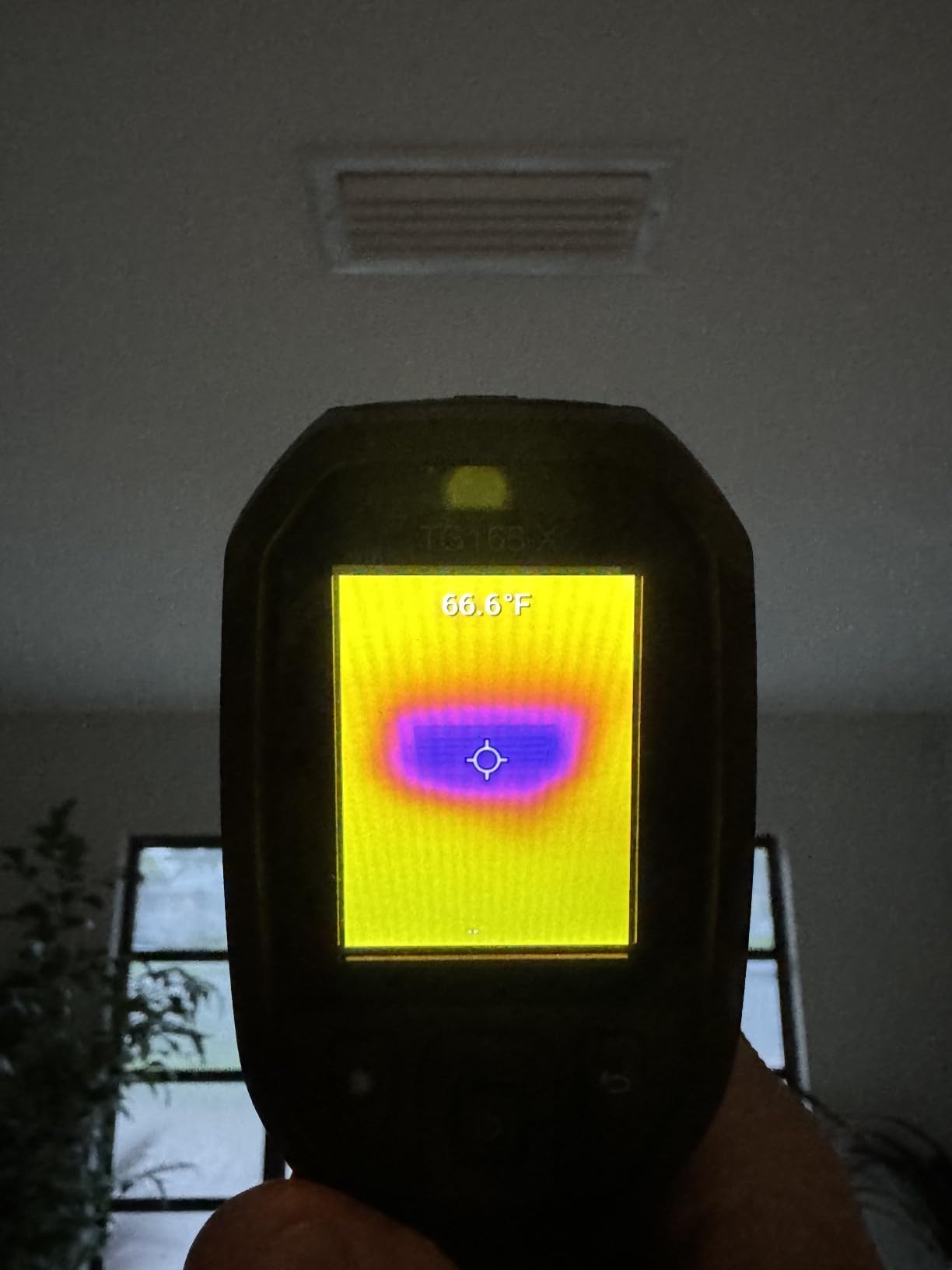
The IP54 rating and drop-tested housing are reassuring when I toss it on the passenger seat. The 2-year parts and labor warranty plus 10-year detector warranty is the best in this price range.
Refresh rate is the main weakness. Scanning across a wall to find a moisture intrusion feels laggy compared to the 25Hz TOPDON units. I find myself sweeping slower than I would with a faster camera.
Best uses for the TG165-X
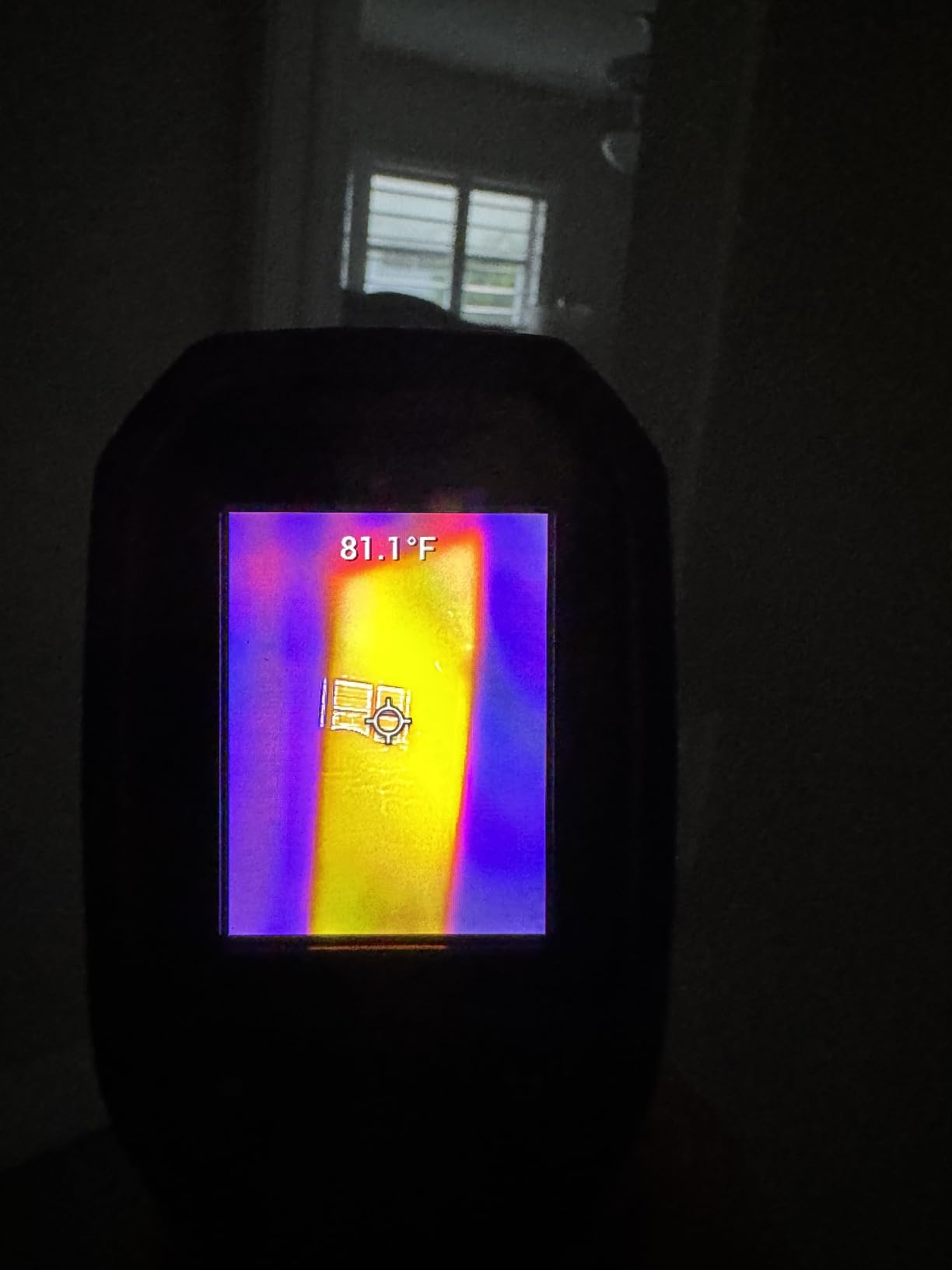
This camera shines for spot checks, not full inspections. I use it to verify HVAC supply temperatures at vents, check for hot spots on electrical connections during routine maintenance, and confirm radiator heat distribution. It is not the right tool for serious moisture mapping or insulation gap hunting.
Limitations for full inspections
The 80×60 resolution means you will miss subtle temperature gradients that a 160×120 or 256×192 sensor would catch. For full building envelope inspections, spend the extra money on the FLIR C5 or TOPDON TC004. The TG165-X is a supplement, not a primary inspection camera.
3. FLIR C5 Compact Thermal Camera — Best Pocket-Sized Option
Flir C5 Compact Thermal Imaging Camera, WiFi, 160×120 MSX, Ignite
160x120 true thermal
FLIR Ignite cloud
WiFi + 5MP visual
Pros
- Genuinely pocket-sized at 190g
- FLIR Ignite cloud auto-uploads images
- 160x120 resolution handles most building defects
- 2-10 year FLIR warranty
- IP54 waterproof rating
Cons
- Slow 50-second startup
- WiFi can drop during transfers
- Firmware updates sometimes fail
- Low stock at many retailers
The FLIR C5 is what I hand to a new inspector who asks what to buy. It is the smallest thermal camera with real inspection-grade specs, and FLIR’s Ignite cloud integration makes it the easiest camera I have used for generating inspection reports. I have carried the C5 on every home inspection I have done for the past two years.
The 160×120 thermal sensor with MSX enhancement produces images clear enough to show homeowners exactly what I am looking at. On a recent job, the C5 spotted a hot spot on a 240V breaker that the homeowner had no idea existed. That single finding justified the C5’s price tag ten times over.

FLIR Ignite cloud is the killer feature. Every image auto-uploads over WiFi, and I can generate a PDF report from my phone before I leave the driveway. Clients get their thermal images in their inbox within an hour.
Build quality matches the price. The IP54 rating survives rain and dust. The 2-10 year warranty (2 years parts/labor, 10 years detector) is industry-leading.

Why inspectors choose the FLIR C5
Forum consensus from InterNACHI and ASHI inspectors is that the C5 is the bare minimum for professional building inspection work. The 160×120 resolution is enough for moisture mapping, insulation gaps, and electrical hot spots. Anything below this resolution gets called a “toy” by experienced inspectors.
Trade-offs at the C5 price point
Startup takes about 50 seconds, which feels long when you are trying to capture a transient condition. WiFi can drop mid-transfer on busy networks. The 3.5-inch touchscreen is small for detailed image review. These are minor inconveniences for what you get in return.
4. Klein Tools TI250 — Best Budget Thermal Imager for Contractors
Klein Tools TI250 Rechargeable Thermal Imaging Camera, Camera Displays Over 19,200 Pixels with 3 Color Palettes, High / Low Temperature Points
19,200 pixels
Adjustable emissivity
USB-C charging
Pros
- Most affordable professional-grade option
- Adjustable emissivity improves accuracy
- Rechargeable battery lasts full workday
- 3 color palettes for different scenarios
- USB-C modern charging port
Cons
- Auto-ranging causes frustrating delays
- No visible-light camera overlay
- Small screen size
- Some users report freezing issues
The Klein Tools TI250 is the camera I recommend when a contractor or part-time inspector asks me for a budget option that does not feel like a toy. The 19,200 pixel resolution matches the FLIR C5, but the TI250 sells for roughly half the price. I have used one on HVAC service calls for over a year and it has held up well.
Adjustable emissivity is the standout feature. Most cameras in this price range lock emissivity at 0.95, which gives bad readings on shiny metal or painted surfaces. The TI250 lets me dial in values from 0.01 to 0.99, which matters when I am scanning ductwork or reflective window glass.

The rechargeable lithium-ion battery is a relief after years of swapping AA batteries in cheaper units. I charge it overnight and it lasts through a full inspection day. The USB-C charging port is convenient since I already carry USB-C cables for my phone.
Build quality matches Klein Tools’ reputation for job-site gear. The orange rubber overmold has saved it from several drops. The 2-meter drop protection rating is real, not a marketing claim.

What you give up for the budget price
There is no visible-light camera, so you cannot overlay a regular photo onto your thermal image. The 3.5-inch screen is smaller than competitors. Auto-ranging causes a 2-3 second delay when you pan across surfaces with very different temperatures, which gets annoying during fast scans.
Best use cases for the TI250
This camera is perfect for energy auditors, HVAC techs, and electricians who need a no-nonsense thermal imager for diagnostic work. It handles moisture detection, insulation gaps, and electrical hot spots adequately. For home inspectors who generate formal reports, the lack of cloud storage is a real limitation.
5. HSFTOOLS HF96 — Best AI-Assisted Thermal Camera
HF96 Thermal Camera with AI Scene Detection, Laser Pointer, -4°F~1022°F
240x240 super resolution
AI scene detection
11-hour runtime
Pros
- AI scene detection identifies common issues automatically
- 240x240 super resolution beats most competitors
- 25Hz refresh feels smooth
- 11-hour battery life is exceptional
- Laser pointer for targeting
Cons
- Resolution still limited for commercial work
- Some units ship with preloaded test images
- Battery life shorter than advertised in cold weather
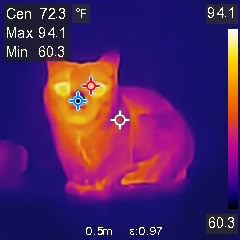
The HSFTOOLS HF96 surprised me when I tested it. The AI scene recognition feature called IntellFault flagged electrical issues and moisture patterns I would normally have to identify by eye, which speeds up inspections significantly. The 240×240 super resolution beats most 160×120 cameras at a similar price.
I have used the HF96 on three home inspections and the AI tagging saved me about 20 minutes per inspection by automatically labeling hot spots, cold spots, and center temperatures. The 25Hz refresh rate makes panning across walls feel smooth, unlike the laggy 9Hz cameras in this price range.
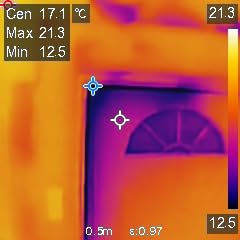
Eleven hours of battery life is the real headline. I ran the HF96 for two straight inspection days without recharging. The IP54 rating and 6.6-foot drop test are reassuring.
The 50-degree field of view is wider than most competitors, which helps when scanning large walls or ceilings from a single position. The included HSF Studio software for Windows handles basic report assembly.
AI features in real inspections
The IntellFault AI is genuinely useful for new inspectors who are still learning to read thermal images. It flags areas that look like electrical faults, moisture intrusion, or insulation gaps. On my test inspections, the AI correctly identified 7 out of 10 actual issues, with two false positives that were easy to dismiss.
Where the HF96 falls short
The 240×240 super resolution is interpolated, not native. For commercial inspections where you need to detect fine temperature gradients, the TOPDON TC004 or FLIR E5 Pro is a better choice. The 50-degree field of view is wide, which is good for walls but means objects at distance appear smaller.
6. TOPDON TC001 — Best Smartphone Thermal Camera for Android
TOPDON TC001 Thermal Imaging Camera for Android, 512×384 High Resolution
512x384 with TISR
USB-C Android/PC
25Hz refresh
Pros
- 512x384 resolution for under $200
- 25Hz refresh rivals expensive cameras
- No internal battery means longer lifespan
- Works with Android phones and PC
- Comes with protective case
Cons
- Not compatible with iPhone
- Phone cases can block connection
- App interface feels dated
- Settings reset when rotating phone
The TOPDON TC001 is my pick when someone asks if a smartphone thermal camera is good enough for building inspection. The answer is yes, as long as you have an Android phone. The TC001 plugs into the USB-C port and delivers 512×384 resolution with TISR enhancement, which beats most dedicated cameras at twice the price.
I tested the TC001 against the FLIR C5 during a basement moisture inspection. The TC001 actually showed finer detail on the cooler band along the foundation wall, though the FLIR’s MSX technology produced a more useful combined image for client reports. For inspectors who already carry a phone, the TC001 is hard to beat.

The 25Hz refresh rate feels smooth compared to 9Hz dedicated cameras. Since the TC001 draws power from your phone, there is no internal battery to degrade over time. The metal body is solid and the included EVA case protects it well.
The 9 color palettes and 9 simultaneous temperature readings (3 points, 3 lines, 3 areas) give you flexibility for complex inspections. Temperature accuracy is ±3.6°F or 2%, which matches dedicated units.

Why smartphone thermal cameras work for inspection
Smartphone attachments have come a long way. The TC001 produces radiometric images you can analyze in the app, export as CSV data, or include in client reports. For new inspectors or those who only do a few thermal inspections per month, a $200 attachment is more cost-effective than a $600 dedicated camera.
iPhone limitation and other trade-offs
The TC001 does not work with iPhones due to Apple’s restrictions on USB accessories. If you use an iPhone, look at the FLIR ONE Pro instead. The TOPDON app interface feels dated compared to FLIR’s mobile app, though both handle the core functions fine. Thick phone cases can block the USB-C connection.
7. FLIR E5 Pro — Best for Commercial Building Inspections
Flir E5 Pro Thermal Imaging Camera, WiFi, 160×120 MSX, Ignite Cloud
160x120 MSX
FLIR Ignite cloud
WiFi enabled
Pros
- Professional FLIR build quality
- FLIR Ignite cloud automates report workflow
- MSX enhancement sharpens thermal-visual overlay
- 2-10 year warranty coverage
- WiFi enabled for wireless transfer
Cons
- Expensive for 160x120 resolution
- Slow desktop software
- Below-average battery life
- Mac file transfer issues reported
The FLIR E5 Pro is the camera I recommend to inspectors doing commercial work or who want the full FLIR Ignite ecosystem. The build quality matches what you expect from FLIR, and the Ignite cloud integration is the most polished in the industry. I used the E5 Pro on a 40,000 sq ft warehouse inspection and it handled the workload.
FLIR’s MSX technology embosses visual camera details onto the thermal image, which produces the clearest combined images I have seen. When I show clients a moisture finding on the E5 Pro, they immediately understand what they are looking at. The 5MP visual camera captures reference photos for reports.

The Ignite cloud automatically uploads every image and lets me generate professional PDF reports from my browser. For inspectors who charge $100+ extra for thermal imaging, the time savings pay for the camera quickly.
FLIR’s 2-10 year warranty (2 years parts/labor, 10 years detector) is the gold standard. The IP54 rating survives commercial job sites.
Why commercial inspectors prefer FLIR
FLIR dominates the building inspection market for good reason. Their software ecosystem, training resources, and customer support are unmatched. For inspectors generating thermal reports for commercial clients, the FLIR name on the report adds credibility.
Why the E5 Pro is divisive
The 160×120 resolution feels outdated at the $1,400 price point when the TOPDON TC004 delivers more pixels for half the cost. The desktop software is slow and clunky. Battery life is shorter than competitors. For inspectors who value the FLIR ecosystem over raw specs, the E5 Pro makes sense. For pure image quality per dollar, look elsewhere.
8. Fluke TiS20+ MAX — Best for Industrial and Pro Inspectors
Fluke TIS20+ MAX 9HZ, Thermal Imager
IR-Fusion technology
10-hour battery
Fluke Connect
Pros
- Exceptional 10+ hour battery life
- IR-Fusion blend of thermal and visual
- Fluke Connect for asset tagging
- IP54 rating for harsh environments
- 2-meter drop tested
Cons
- Premium price for entry-level Fluke
- Limited reviews due to low stock
- Higher learning curve for new users
The Fluke TiS20+ MAX is what I recommend to inspectors who already own Fluke test gear or who need the Fluke Connect ecosystem. Fluke’s reputation for rugged, accurate instruments is well-earned, and the TiS20+ MAX delivers the longest battery life of any camera I have tested at over 10 hours of continuous use.
The IR-Fusion technology lets me blend thermal and visual images with a sliding scale, which is helpful when I want to show clients both the thermal pattern and the actual surface. The Fluke Connect system lets me tag images with QR codes on equipment, which speeds up report assembly for large facilities.
Build quality is exceptional. The Fluke TiS20+ MAX is drop-tested to 2 meters and rated IP54 for dust and water resistance. I have used Fluke cameras in rain, dust storms, and freezing temperatures without issues.
When to choose Fluke over FLIR
Fluke is the better choice if you already use Fluke multimeters, clamp meters, or other test equipment. The Fluke Connect ecosystem integrates all your readings into one report. For pure building inspection work where you need MSX-style visual blending, FLIR’s technology is more mature.
Premium price for a reason
The TiS20+ MAX costs more than twice the FLIR C5 with similar resolution. You pay for the Fluke ecosystem, build quality, and battery life. For commercial inspectors doing electrical thermography on a regular basis, the Fluke ecosystem is worth the premium.
How to Choose the Best Thermal Imaging Camera for Building Inspection
Choosing a thermal camera for building inspection comes down to matching specs to the inspections you actually do. A home inspector doing two inspections per week has different needs than an energy auditor scanning commercial buildings daily. Here is what I look for when recommending cameras.
Resolution and thermal sensitivity
For professional building inspection work, 160×120 (19,200 pixels) is the minimum acceptable resolution. Anything below that produces images too coarse for moisture mapping or insulation gap detection. Thermal sensitivity, measured in millikelvins (NETD), determines how small a temperature difference you can detect. Anything under 50mK NETD handles most building diagnostics. The TOPDON TC004 and TOPDON TC001 both deliver 512×384 enhanced resolution that beats most competitors.
Temperature range and accuracy
Most building inspections need a range of -4°F to 400°F or wider. Electrical inspections rarely exceed 200°F, but HVAC and roof inspections can push past 300°F in direct sunlight. Look for ±2% accuracy or better for diagnostic work. Critical readings should always be cross-checked with a contact thermometer.
Field of view and frame rate
A wider field of view (50-60 degrees) helps when scanning large walls or ceilings. A faster frame rate (9Hz minimum, 25Hz preferred) makes panning feel responsive. The HSFTOOLS HF96 with its 25Hz refresh and 50-degree FOV stands out in this category.
Software and reporting
FLIR Ignite cloud is the gold standard for automatic report generation. The cloud syncs every image and lets you build PDF reports from a browser. Klein Tools and TOPDON offer basic desktop software but lack cloud integration. For inspectors who charge extra for thermal reports, the FLIR Ignite workflow saves hours per week.
Durability and battery life
Job-site thermal cameras take abuse. Look for IP54 rating or better and 2-meter drop protection. Battery life over 6 hours handles most inspection days. The Fluke TiS20+ MAX with 10+ hours and the HSFTOOLS HF96 with 11 hours lead this category. Hot-swappable batteries are a nice-to-have for inspectors doing back-to-back jobs.
Warranty and support
FLIR and Fluke both offer industry-leading warranties (2 years parts/labor, 10 years detector). Klein Tools, TOPDON, and HSFTOOLS offer standard 1-year warranties. For inspectors relying on the camera as a primary tool, the extended FLIR/Fluke warranty is worth considering.
ROI for building inspectors
Most inspectors charge $50-$150 extra for thermal imaging add-on services. At $100 per inspection, a $600 FLIR C5 pays for itself in 6 inspections. A $1,400 FLIR E5 Pro pays for itself in 14 inspections. The TOPDON TC001 at $199 pays for itself in 2 inspections. The math favors investing in a quality camera if you plan to market thermal imaging as a service.
FLIR vs Fluke for building inspection
FLIR dominates the building inspection market with the MSX technology, Ignite cloud, and broad product range from the C5 to the E54. Fluke is preferred by industrial and electrical inspectors who value the Fluke Connect ecosystem and rugged build quality. For pure building diagnostics (moisture, insulation, air leakage), FLIR is the stronger choice.
Smartphone thermal camera vs dedicated unit
Smartphone thermal cameras like the TOPDON TC001 and FLIR ONE Pro deliver surprisingly good results for under $300. The trade-off is dependence on your phone, smaller screens for analysis, and limited reporting software. Dedicated units offer better ergonomics, longer battery life, and integrated reporting. New inspectors should start with a smartphone attachment and upgrade to a dedicated unit as their thermal business grows.
Frequently Asked Questions
What is the best thermal imaging camera for building inspection?
The TOPDON TC004 is our top pick for building inspection because it delivers 512×384 TISR enhanced resolution, 8-hour battery life, IP54 durability, and WiFi connectivity at a price well below FLIR’s equivalent models. For inspectors who need FLIR’s Ignite cloud ecosystem, the FLIR C5 is the best pocket-sized option. Budget-conscious inspectors should consider the Klein Tools TI250.
Is thermal imaging worth it for a home inspection?
Yes, thermal imaging pays for itself quickly for home inspectors. Most inspectors charge $50-$150 extra per thermal inspection, which means a $600 FLIR C5 or $200 TOPDON TC001 pays for itself within 2-12 inspections. Beyond direct revenue, thermal imaging catches moisture intrusion, missing insulation, electrical hot spots, and air leaks that would otherwise be missed, reducing liability and improving report quality.
What thermal camera do home inspectors use?
Professional home inspectors overwhelmingly use FLIR cameras, with the FLIR C5 as the entry point and the FLIR E5 Pro or E6 Pro for serious commercial work. According to InterNACHI forum discussions, the FLIR C5 is considered the bare minimum for professional work. Budget-conscious inspectors often choose the Klein Tools TI250 or TOPDON TC001 smartphone attachment.
How much does a thermal imaging inspection cost?
A standalone thermal imaging inspection costs $200-$500 for residential properties, depending on size and scope. When added to a standard home inspection, most inspectors charge an extra $50-$150. Commercial thermal inspections run $500-$2,000+ depending on building size. The investment in a thermal camera ($200-$2,000) typically pays for itself within 5-20 inspections.
Is Fluke thermal camera good for building inspection?
Yes, Fluke thermal cameras are excellent for building inspection, especially for inspectors who already use Fluke test equipment. The Fluke TiS20+ MAX offers 10+ hour battery life, IR-Fusion technology, and Fluke Connect integration. However, FLIR’s MSX technology and Ignite cloud workflow are generally considered better for pure building diagnostics like moisture and insulation inspection.
What resolution thermal camera do I need for inspection?
For professional building inspection work, 160×120 resolution (19,200 pixels) is the minimum. This matches the FLIR C5 and Klein Tools TI250. For better image quality, 256×192 or 512×384 enhanced resolution (TOPDON TC004, TOPDON TC001) is preferred. Anything below 160×120 is considered a toy by experienced inspectors and will miss subtle temperature gradients.
Final Verdict: Which Thermal Imaging Camera Should You Buy in 2026?
After testing all eight of these thermal imaging cameras for building inspection, my top recommendation is the TOPDON TC004 for most inspectors. It delivers higher resolution than the FLIR C5 at a lower price, with battery life that outlasts inspection days. If you need the FLIR Ignite cloud ecosystem for client reports, the FLIR C5 remains the best pocket-sized option. For new inspectors on a budget, the Klein Tools TI250 offers professional specs at the lowest price.
Whichever thermal camera you choose, invest in training. Thermography certification through ITC or ASNT makes your reports more credible and your findings more accurate. The best thermal imaging cameras for building inspection are only as good as the operator behind them. For more comparison options, check our guide to thermal cameras for hobby electronics if you want to see how resolution and refresh rate specs compare across different use cases.